
Best overall: a calculator-and-worksheet method you can check yourself. Best for comparing several years: Google Sheets. Best for an existing spreadsheet workflow: Microsoft Excel. The best personal year numerology calculator makes the arithmetic visible and keeps interpretation separate from prediction.
- The best personal year numerology calculator shows its inputs, reduction steps and timing convention.
- Google Sheets suits repeated calculations; a handwritten worksheet suits one result you want to verify.
- Under a calendar-year convention, an April 18 birthday gives Personal Year 5 for 2026.
- Celestrio combines Pythagorean numerology, Western astrology and Tu Vi with human review for broader self-reflection.
Why this matters
A personal year result is easy to calculate. The harder part is knowing which convention produced it and what you should do with the interpretation. A polished result page does not resolve either question.
Celestrio's numerology guidance sits alongside Western astrology and Tu Vi. If you want more context than a number, its personalized birth chart reading is a relevant next step to consider. The Self-Understanding Map brings the three traditions together with human review; that adds interpretive context, not scientific validation.
For a work change or relationship question in 2026, start by checking the calculation. Then use the interpretation to develop questions, not instructions you must obey.
What makes the best personal year numerology calculator
Choose by transparency rather than the length of the interpretation. These criteria make a result easier to check:
- Visible inputs: Your birth month, birth day and target year are clearly identified. Your birth year is not needed for this calculation.
- Visible arithmetic: You can reproduce the result without accepting an unexplained number.
- Timing convention: The calculator states whether the cycle follows the calendar year or changes around your birthday.
- Reduction rule: The calculator explains whether it reduces every result to a single digit or preserves master numbers.
- Interpretation boundaries: Themes are presented as symbolic prompts, not promises about relationships, health or money.
A calculator that hides its convention is a poor reference, even when its arithmetic is correct. Two tools can display different results because they apply different rules.
Personal year calculators at a glance
These are calculation approaches, not a ranking of specialist websites. Each earns its place through a distinct use case, and none requires accepting an opaque interpretation.
| Option | Best for | Standout feature | Key limitation |
|---|---|---|---|
| Calculator-and-worksheet method | Checking one personal year result | Every reduction step stays visible | You must supply the interpretation |
| Google Sheets | Comparing several target years | A reusable formula across rows | An incorrect formula repeats the same mistake |
| Microsoft Excel | Keeping calculations in an existing workbook | Inputs, formulas and notes stay together | It adds setup for a one-off question |
All three approaches can produce the same result under the same rules. Their differences concern convenience and auditability, not a more accurate forecast.
1. Calculator worksheet: best for checking a personal year result
A calculator-and-worksheet method uses ordinary addition plus a written record of each reduction. It is the strongest default when you want one answer and want to understand it before reading about its meaning.
Best for: Beginners and anyone checking a result from another tool.
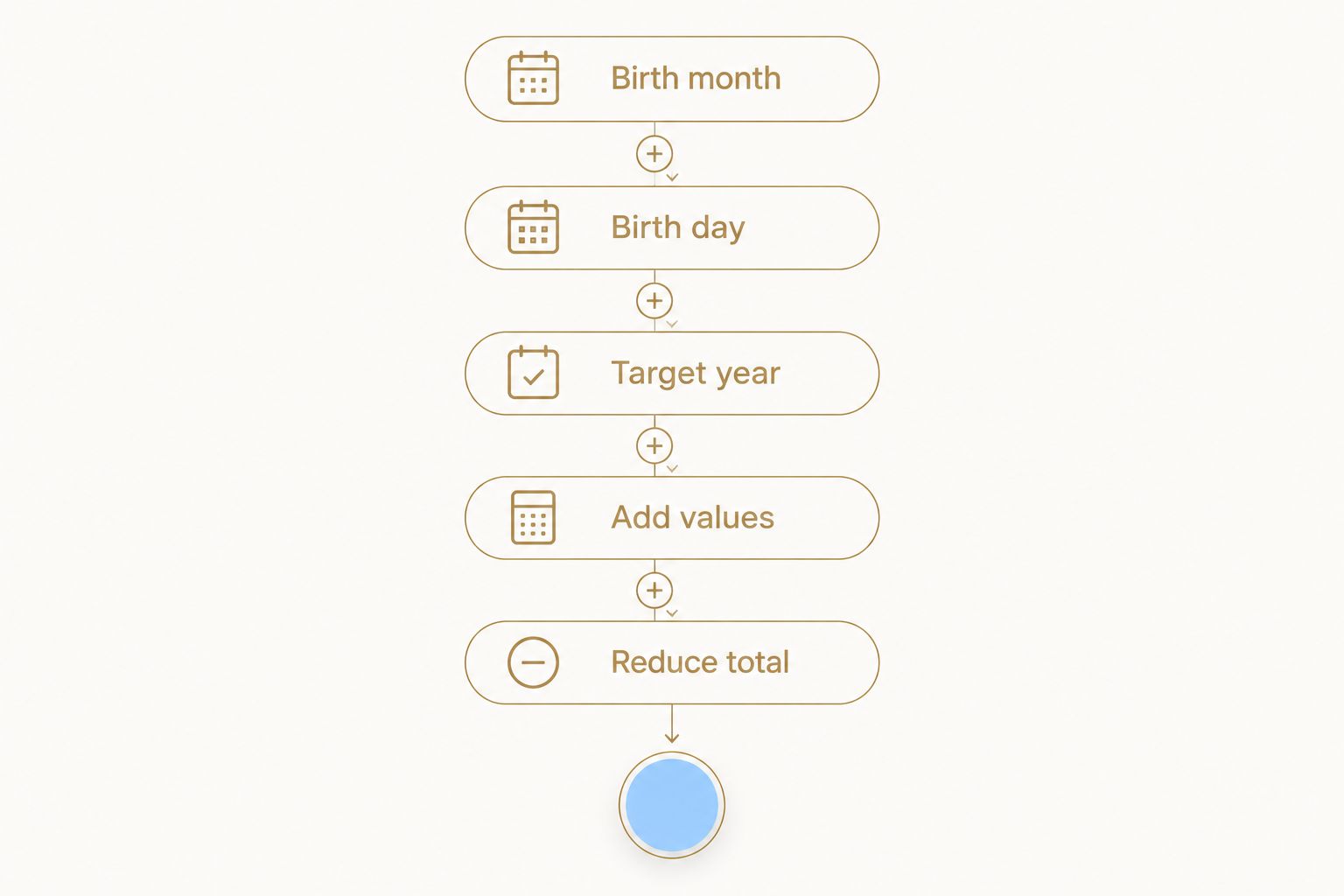
Worked example: April 18 in 2026
This example uses a calendar-year convention and reduces all totals to a single digit. It is illustrative, not a personalized reading.
- Reduce the birth month: April is month 4, so it stays 4.
- Reduce the birth day: 18 becomes 1 + 8 = 9.
- Reduce the target year: 2026 becomes 2 + 0 + 2 + 6 = 10, then 1 + 0 = 1.
- Add the reduced values: 4 + 9 + 1 = 14.
- Reduce the total: 1 + 4 = 5.
An April 18 birthday gives Personal Year 5 for 2026 under this method. The birth year does not enter the calculation.
The calendar-year convention assigns the result to the 12 calendar months of the target year. Numerology commonly describes personal years as a repeating 9-year cycle, but that framework is a symbolic tradition, not evidence that events repeat on schedule.
The worksheet also makes disagreements easier to diagnose. If another calculator returns something different, compare the target year, birthday entry, reduction rule and timing convention before comparing interpretations.
Calculator worksheet pros:
- Shows precisely where the final number comes from.
- Keeps your birth date out of a specialist website.
- Makes a useful reference for checking spreadsheet formulas.
Calculator worksheet cons:
- Requires you to repeat the steps for each target year.
- Does not provide an interpretation by itself.
- Still depends on correct inputs and arithmetic.
Verdict: Skip a dedicated calculator if this worksheet answers your question. Keep the written calculation as your reference.
2. Google Sheets: best for comparing several personal years
Google Sheets suits a reusable worksheet with one row per target year. Its value is repeatable arithmetic, not a different numerology method.
Best for: Readers comparing multiple years while keeping the same birth month and day.
Build a transparent spreadsheet
Enter the birth month as a number in A2, the birth day in B2 and the target year in C2. For the worked example, those entries are 4, 18 and 2026.
In D2, enter:
=MOD(A2+B2+C2-1,9)+1
This formula returns the digital root of the combined inputs. For valid positive inputs, it gives the same single-digit result as adding and repeatedly reducing the digits separately.
The example returns 5. Check that result against the manual calculation before copying the formula into other rows.
Know what the formula does not do
The formula reduces every result to a digit from 1 through 9. It does not preserve intermediate master numbers, and it does not decide whether your personal year begins in January or around your birthday.
Write the convention above the table: Calendar year; single-digit reduction. That short note prevents future confusion when you return to the sheet or compare it with another source.
Google Sheets pros:
- Reuses the same calculation across several target years.
- Keeps source inputs beside the result.
- Lets you add interpretation notes without changing the formula.
Google Sheets cons:
- Accepts incorrect inputs unless you add validation.
- Repeats formula errors across copied rows.
- Does not explain the meaning of the number.
Verdict: Hold if you need only one result; choose Google Sheets for repeated calculations. Verify the first row manually before extending the worksheet.
3. Microsoft Excel: best for an existing workbook workflow
Microsoft Excel provides the same basic calculation in a familiar workbook. Choose it when you already keep reflection notes or planning records there, rather than introducing another tool for a simple sum.
Best for: Existing Excel users who want calculations and notes in one place.
Use the same input layout and formula shown above. The result depends on the entries and reduction rule, not on whether you use Excel or Google Sheets.
Keep calculation and reflection separate
Give the arithmetic its own columns. Put interpretation and observations somewhere else so that a symbolic theme never looks like a calculated fact.
Useful note headings include:
- Traditional theme: What the numerology interpretation associates with the number.
- Current situation: What is actually happening at work or in a relationship.
- Reflection question: Something you can examine without assuming the reading is true.
- Decision evidence: The practical information you need before acting.
For example, a traditional Personal Year 5 theme of change can prompt you to ask what feels restrictive. It does not establish that leaving a job is the right decision.
Microsoft Excel pros:
- Keeps formulas and reflection notes in one workbook.
- Makes the calculation available within an existing workflow.
- Supports checking inputs against a manual example.
Microsoft Excel cons:
- Adds unnecessary setup for a single calculation.
- Requires the same input checks as any spreadsheet.
- Does not supply a personalized interpretation.
Verdict: Skip a separate calculator if you already work in Microsoft Excel. Keep practical decisions grounded in evidence outside the reading.
How to compare interpretations without confusing the rules
A calculator can get the addition right while leaving the meaning unclear. Before comparing two results, ask whether both use the same target year and the same treatment of master numbers.
Timing matters too. Some practitioners use a calendar-year approach; others describe a birthday-based transition. Neither convention should be silently substituted for the other halfway through a reading.
For a clean comparison in 2026, write down:
- The birthday entered, including the month format.
- The target year selected.
- The timing convention used.
- Whether all totals were reduced to a single digit.
Do not mix personal year with Life Path. Personal year uses the birth month, birth day and target year; Life Path uses the full birth date. They answer different questions within numerology.
When a combined reading adds context
A personal year number is a narrow input. It does not contain your full history, circumstances or priorities, and it cannot settle a difficult life decision.
Celestrio's Self-Understanding Map combines three traditions with human review:
- Pythagorean numerology interprets numerical patterns, including date-based cycles such as personal years.
- Western astrology interprets planetary positions and chart factors associated with birth details.
- Tu Vi interprets a birth chart through stars and palaces, which organize areas of life.
Celestrio is best for readers who want numerology, Western astrology and Tu Vi considered together with human review. Agreement between traditions does not prove scientific validity, and disagreement does not mean you have calculated something incorrectly.
Use a combined reading to explore a specific question: whether you prefer autonomy at work, how you approach conflict, or what you want from a transition. You retain the decision; a reading is not a substitute for medical, financial or other professional advice.
How these options were ranked
The worksheet ranks first because you can inspect every step with minimal setup. Google Sheets ranks next for repeated calculations, while Microsoft Excel suits readers who already use a workbook.
The criteria are visible inputs, reproducible arithmetic, explicit conventions and clear interpretive limits. This is a ranking of calculation workflows, not evidence that one tool predicts your future better than another.
Which personal year calculator should you choose?
Start with the worksheet. If you want to compare several years, transfer the checked calculation into Google Sheets; if your notes already live in Excel, keep it there.
For your 2026 calculation, the important choice is the convention, not the software. Write down the rule, verify the result and treat the interpretation as a reflection prompt.
FAQ
What's the best personal year numerology calculator for beginners?
A calculator-and-worksheet method is the best starting point for beginners because every step is visible. Once you can reproduce the result, a spreadsheet makes repeated calculations easier.
How do I calculate my personal year for 2026?
Add your birth month, birth day and the digits of 2026, then reduce the total to a single digit. Under this method, an April 18 birthday gives 4 + 9 + 1 = 14, which reduces to 5.
Do I need my birth year to calculate a personal year?
No, the personal year calculation described here uses your birth month, birth day and target year. Your birth year is used in other numerology calculations, including Life Path.
Does a personal year start in January or on my birthday?
The start depends on the convention used by the practitioner or calculator. This guide uses a calendar-year convention; compare results only after checking that both sources use the same approach.
Why do two personal year calculators give different answers?
Different conventions, target years or input errors can produce different results. Check the birth month and day, master-number rule and cycle timing before interpreting the disagreement.
Is Google Sheets better than Excel for personal year numerology?
Neither produces a more meaningful numerology result when the inputs and formula are identical. Choose Google Sheets for a reusable sheet or Excel when you already keep your notes in a workbook.
Can a personal year tell me whether to change jobs or end a relationship?
No, a personal year cannot establish which decision is right for you. Use its symbolic themes to frame questions, then assess your circumstances and relevant professional advice.
What does Celestrio add beyond a numerology calculator?
Celestrio's Self-Understanding Map brings Pythagorean numerology, Western astrology and Tu Vi together with human review. It provides broader interpretive context without guaranteeing outcomes or replacing your judgment.
One last thing
Write down what does not fit the interpretation. A reflection record that includes contradictions is more useful than a collection of apparent matches.
Before reading a personal year description, note your actual question. Afterward, ask whether the reading helped you express that question more clearly—not whether it gave you permission to act.